
Adjusting the height: manual head restraints
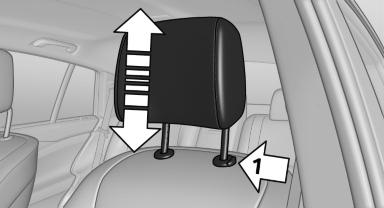
Adjusting the height: manual head
restraints
▷ To raise: pull.
▷ To lower: press the button, arrow 1, and push the head restraint down.
See also:
Resetting the tone settings
1. "CD/Multimedia", "Radio" or "Settings"
2. "Tone"
3. "Reset" ...
Selecting the calendar day
1. Select the date.
2. Select the desired day or date.
"Next day"
"Date:"
"Previous day"
"Today"
...
Rear
Opening
Press on the cover.
Emptying
Take out the insert.
Lighter
Push in the lighter.
Danger of burns
Only hold the hot lighter by its knob; otherwise,
there is the danger of getting bu ...