
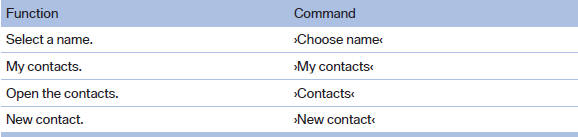
Contacts
See also:
Automatic climate control with enhanced features
Automatic climate control with enhanced features
1 Seat heating, left
2 Temperature, left
3 AUTO program
4 Display
5 Maximum cooling
6 Temperature, right
7 Seat heating, right
8 Cooling func ...
Look well ahead when driving
Avoid unnecessary acceleration and braking.
By maintaining a suitable distance to the vehicle
driving ahead of you.
Driving smoothly and looking ahead reduces
fuel consumption. ...
At a glance
1 Fuel gauge
2 Speedometer
3 Indicator/warning lamps
4 Tachometer
5 Oil temperature
6 External temperature
7 Electronic displays
8 Miles, trip miles
9 Clock
10 Display/reset miles ...