
Office information
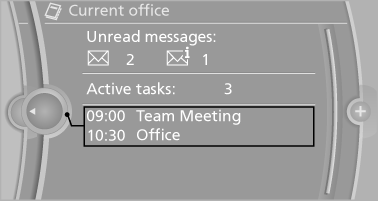
The number of unread messages and active tasks as well as the upcoming appointments are displayed.
1. "Office".
2. "Current office".
3. Select the desired entry to display details.
See also:
Removing the ski bag
The ski bag can be removed entirely, e.g., to dry
quickly or to use other inserts.
1. Pull the handle forward and lift the ski bag
out.
2. Close the cover in the cargo area.
More information ...
2010 BMW X6 Review
Crow tastes better with the right seasoning.
After writing a less-than-favorable review of the 2010 BMW 5 Series GT, I had visions of putting Mangus Hirschfield behind the wheel of the 2010 X6 M.
B ...
Concierge service
General information
The BMW Assist Concierge service offers information
on events, gas stations or hotels, and
provides phone numbers and addresses. Hotels
can be booked directly by the BMW Ass ...