
Entering a phone number
Dialing a number
When entering phone numbers, you can switch between entering letters and numbers.
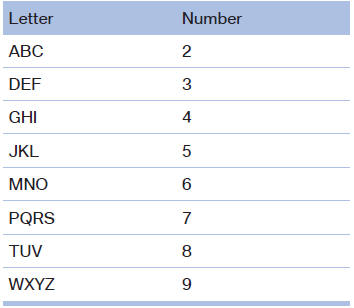
Service numbers can be entered more easily, e. g. 1-888-BMW-CARD.
1. "Telephone".
2. "Dial number".
3. Select the digits individually.
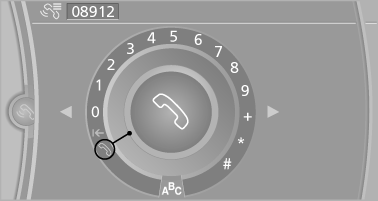
4. Convert to letters as required.
 Select the symbol.
Select the letters individually.
5.  Select the symbol.
 Select symbol to convert to
numbers.
Select symbol to convert to
numbers.
Phone numbers can also be entered by voice.
Only numbers can be spoken.
Letter/number assignment
See also:
xDrive*
xDrive is the all-wheel-drive system of your vehicle.
Concerted action by the xDrive and DSC
further optimize traction and driving dynamics.
The xDrive all-wheel-drive system variably distribute ...
Automatic deactivation during forward travel
The system switches off when a certain driving
distance or speed is exceeded.
Switch the system back on if necessary. ...
Pressure specifications
The tire inflation pressure table, contains all pressure specifications
for the specified tire sizes at the ambient temperature.
Pressure specifications apply to approved
tire sizes and recommend ...