
At a glance
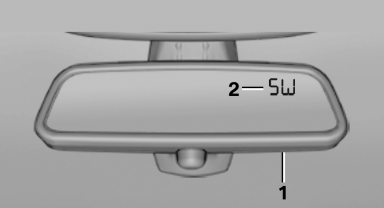
1 Control button
2 Mirror display
See also:
Adding engine oil
760i/Li: open/close flap
When the flap is closed, it must latch
Filler neck
When the indicator lights up in the instrument
cluster, add 1 US quart/liter of engine oil within
the next 125 mi ...
Malfunction
A Check Control message is displayed.
On the Control Display, the areas in front of and
behind the vehicle are shaded. PDC has failed.
Have the system checked.
To ensure full operability:
...
Activating/deactivating the functions
Several menu items are preceded by a checkbox.
It indicates whether the function is activated
or deactivated. Selecting the menu item
activates or deactivates the function.
The function is acti ...