
Controls
At a glance
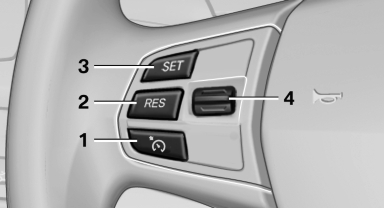
At a glance
1 System on/off, interrupt
2 Resume speed
3 Store speed
4 Store, maintain/change speed
Switching on
 Press the button on the steering
wheel.
Press the button on the steering
wheel.
The marking in the speedometer is set to the current speed.
Cruise control can be used.
Switching off
 Deactivated or interrupted
system
Deactivated or interrupted
system
If the system is deactivated or interrupted, actively intervene by braking and, if necessary, with evasive maneuvers; otherwise, there is the danger of an accident occurring.
 Press the button.
▷ If active: press twice.
▷ If interrupted: press once.
The displays go out. The stored desired speed is deleted.
Interrupting
 When active, press the button.
The system is automatically interrupted if:
▷ The brakes are applied.
▷ The clutch pedal is depressed.
▷ Transmission position D is disengaged.
▷ DTC Dynamic Traction Control is activated or DSC is deactivated.
▷ DSC is actively controlling stability.
Maintaining/storing the current speed
 Press the button.
or
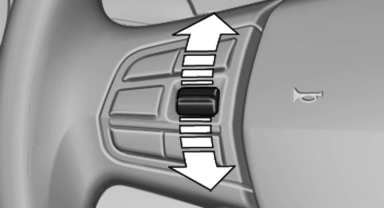
Press the rocker switch while the system is interrupted.
When the system is switched on, the current speed is maintained and stored as the desired speed.
It is displayed in the speedometer and briefly displayed in the instrument cluster, Displays in the speedometer.
When cruise control is maintained or stored, DSC Dynamic Stability Control is switched on, if necessary.
Change, maintain speed
The rocker switch can be pressed while interrupted to maintain and store the current speed.
 Adapting the desired speed
Adapt the desired speed to the road conditions and be ready to brake at all times; otherwise, there is the danger of an accident occurring.
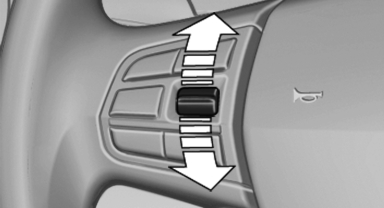
Press the rocker switch up or down repeatedly until the desired speed is set.
If active, the displayed speed is stored and the vehicle reaches the stored speed if the road is clear.
▷ Each time the rocker switch is pressed to the point of resistance, the desired speed increases or decreases by approx. 1 mph/ 1 km/h.
▷ Each time the rocker switch is pressed past the point of resistance, the desired speed increases or decreases by a maximum of 5 mph/10 km/h.
▷ Pressing the rocker switch to the resistance point and holding it accelerates or decelerates the vehicle without requiring pressure on the accelerator. After the rocker switch is released, the vehicle maintains its final speed. Pressing the switch beyond the resistance point causes the vehicle to accelerate more rapidly.
Resuming the desired speed
 Press the button.
The stored speed is reached and maintained.
See also:
Reminders
Displaying remindersReminders for imminent appointments and tasks are displayed. After an appointment
has passed or a task is due, the reminder is no longer displayed.
1. "Office"
...
At a glance
At a glance
1 Function bar
2 Route section with traffic obstruction
3 Traffic sign for traffic obstruction
4 Planned route
5 Current location
6 Upper status field
7 Lower status field
Lines ...
Navigation
General information
Map
Split screen settings
Destination guidance with intermediate destinations
...