
Buttons at a glance
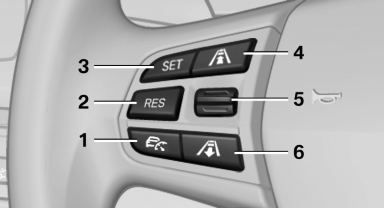
Buttons at a glance
1 System on/off, interrupt
2 Resume speed
3 Store speed
4 Reduce distance
5 Store, maintain/change speed
6 Increase distance
See also:
Loss of the remote controls
Lost remote controls can be blocked by your
service center. ...
Notes
No loose objects in the
passenger compartment
Do not stow any objects in the passenger compartment
without securing them; otherwise,
they may present a danger to occupants for instance
durin ...
Ashtray
Opening
Push the ridge on the cover.
Emptying
Lift out the insert.
Lighter
With the engine running or the ignition switched on, press in the cigarette lighter.
The lighter can be pulled out as s ...