
Units of measure
Setting the units of measure
To set the units for fuel consumption, route/distance
and temperature:
1. "Settings"
2. "Language/Units"
3. Select the desired menu item.
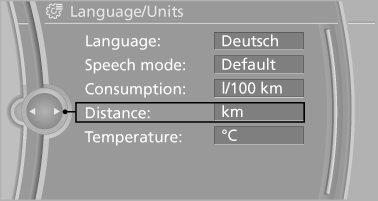
4. Select the desired unit.
The setting is stored for the remote control currently in use.
See also:
Coupe: ski bag
The ski bag is designed for safe, clean transport of up to 4 pairs of standard
skis or up to 2 snowboards.
With the ski bag you can stow skis with a length of up to 6.6 ft/2.0 m. When
skis of 6.6 ...
Filtering the message list
The message list can be filtered, when more
than one type of message exists.
1. "Filter:"
2. Select the type of message.
"All"
All messages are displayed.
"E-m ...
Sockets
The lighter socket can be used as a socket for
electrical equipment while the engine is running
or when the ignition is switched on. The total
load of all sockets must not exceed 140 watts at
...