
Time
Setting the time
1. "Settings"
2. "Time/Date"
3. "Time:"
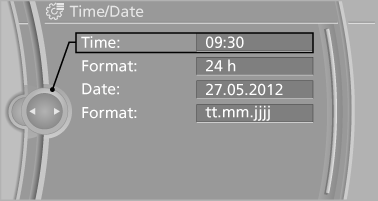
4. Turn the controller until the desired hours
are displayed.
5. Press the controller.
6. Turn the controller until the desired minutes
are displayed.
7. Press the controller.
The time is stored.
Setting the time format
1. "Settings"
2. "Time/Date"
3. "Format:"
4. Select the desired format.
The time format is stored.
See also:
Exporting/importing contacts
Contacts can be exported and imported via the
Personal Profile. The contacts
stored in the vehicle are exported, but not those
from the mobile phone. ...
Automatic Service Request
Data regarding the maintenance status or legally
mandated inspections of the vehicle are automatically
transmitted to your service center before
a service due date.
You can check when your serv ...
Incoming call
Receiving calls
If the number of the caller is stored in the phone
book and is transmitted by the network, the
name of the contact is displayed. Otherwise,
only the phone number is displayed.
...