
Display on the Control Display
Display the computer or trip computer on the Control Display.
1. "Vehicle Info"
2. "Onboard info" or "Trip computer"
Resetting the fuel consumption or speed
1. "Vehicle Info"
2. "Onboard info"
3. "Cons." or "Speed"
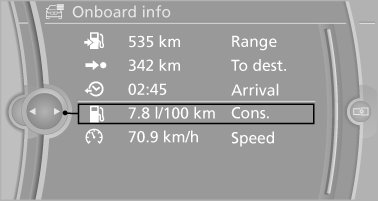
4. "Yes"
See also:
Example: playing back a CD
1. Switch on the Entertainment sound output
if necessary.
2.
Press the button on the steering
wheel.
3. ›C D and multimedia‹
The medium last played is played back.
4.
Press the button ...
Luxury Line
The discreet high-gloss chrome elements of this line lend the exterior of the
BMW 3-Series Sedan a particularly elegant and exclusive appeal. The BMW kidney
grille with 11 fine chrome slats, two s ...
Vehicle equipment
All standard, country-specific and optional
equipment that is offered in the model series is
described in this chapter. Therefore, equipment
is also described that is not available in a vehicle, ...