
Engine oil temperature
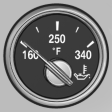
▷ Cold engine: the pointer is at the low temperature end.
Drive at moderate engine and vehicle speeds.
▷ Normal operating temperature:
the pointer is in the middle or in the left half of the temperature display.
▷ Hot engine: the pointer is at the high temperature end. A Check Control message is displayed in addition.
See also:
Controls
1 Control Display
2 Controller with buttons
The buttons can be used to open the menus
directly. The controller can be used to select
menu items and create the settings. ...
With the Professional navigationsystem: map view for split screen
The map view can be selected for the split
screen independently from the main screen.
1. Open "Options".
2. "Split screen"
3. Move the controller to the right repeatedly
until ...
Opening the Options menu
Press the button.
The "Options" menu is displayed.
Additional options: move the controller to the
right repeatedly until the "Options" menu is displayed.
Options menu
The ...