
Overview, instrument cluster with enhanced features
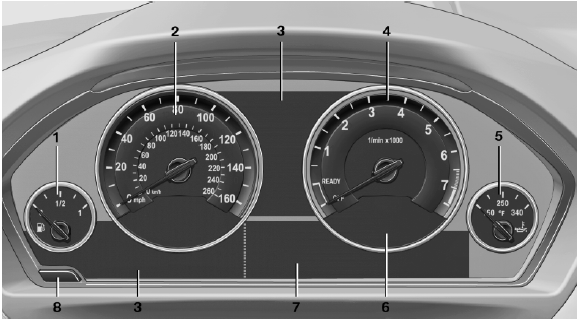
Overview, instrument cluster with enhanced features
1 Fuel gauge
2 Speedometer
3 Indicator/warning lamps
4 Tachometer
5 Engine oil temperature
6 Current fuel consumption
7 Electronic displays
8 Display/reset miles
See also:
Ambient light
Depending on the equipment, the lighting can
be individually adjusted in the interior for some
lights.
Selecting color scheme
1. "Settings"
2. "Lighting"
3. "Ambient:& ...
Safety
The BMW 5 Series has earned Top Safety Pick status from the Insurance
Institute for Highway Safety for top scores in frontal, side and rear crash
tests and a roof-strength test that reflects rollo ...
Loss of the remote controls
Lost remote controls can be blocked by your
service center. ...