
Activating/deactivating the system manually
Using the button
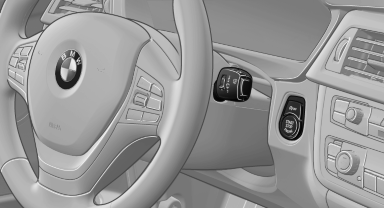
Using the button
 Press the button.
▷ LED comes on: Auto Start Stop function is deactivated.
The engine is started during an automatic engine stop.
The engine can only be stopped or started via the Start/Stop button.
▷ LED goes out: Auto Start Stop function is activated.
Switching off the vehicle during an automatic engine stop
During an automatic engine stop, the vehicle can be switched off permanently, e.g., when leaving it.
1. Press the Start/Stop button. The ignition is switched off. The Auto Start/Stop function is deactivated.
Automatic transmission: the transmission position P is engaged automatically.
2. Set the parking brake.
Engine start as usual via start/stop button.
See also:
Tone
Vehicle equipment
All standard, country-specific and optional
equipment that is offered in the model series is
described in this chapter. Therefore, equipment
is also described that is not avai ...
Safety switch
The following functions can be locked simultaneously,
using the switch:
Opening and closing of the rear windows
using the switches in the rear.
Operation of the roller sunblinds* using the ...
Drive away without delay
Do not wait for the engine to warm up while the
vehicle remains stationary. Start driving right
away, but at moderate engine speeds.
This is the fastest way for the cold engine to
reach its oper ...