
Child restraint fixing system with a tether strap
Note
 LATCH mounting eyes
Only use the mounting eyes for the upper LATCH retaining strap to secure child restraint fixing systems; otherwise, the mounting eyes could be damaged.
Mounting points
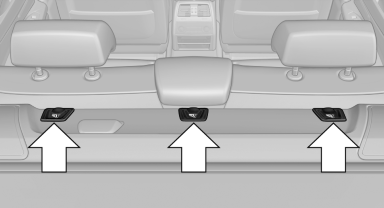
Mounting points
Depending on the vehicle equipment, there are two outer or three mounting points for child restraint fixing systems with a tether strap.
Retaining strap guide
 Retaining strap
Make sure that the upper retaining strap is not routed over the head restraints or sharp edges and is free of twisting on its way to the upper mounting point; otherwise, the belt cannot properly secure the child restraint fixing system in an accident.
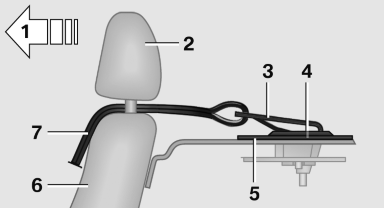
1 Direction of travel
2 Head restraint.
3 Hook for upper retaining strap
4 Mounting point/eye
5 Rear window shelf
6 Seat backrest
7 Upper retaining strap
Attaching the upper retaining strap to the mounting point
1. Remove the mounting point cover.
2. Raise or remove head restraints.
3. Guide the upper retaining strap between the supports of the head restraint.
4. Attach the hook of the retaining strap to the mounting eye.
5. Tighten the retaining strap by pulling it down.
6. Lower and lock head restraints as needed.
See also:
Side View
The concept
Side View provides an early look at cross traffic
at blind driveways and intersections. Road users
concealed by obstacles to the left and right of
the vehicle can only be detected r ...
Starting the engine
Do not run the engine in enclosed areas; otherwise,
the inhalation of toxic exhaust gases can cause loss of consciousness and death.
The exhaust gases contain carbon monoxide, an odorless and col ...
Service and Warranty Information Booklet for US models and
Warranty and Service Guide Booklet for Canadian models
Please consult your Service and Warranty Information
Booklet for US models and Warranty and
Service Guide Booklet for Canadian models for
additional information on service requirements.
Mainten ...