
Buttons on the remote control
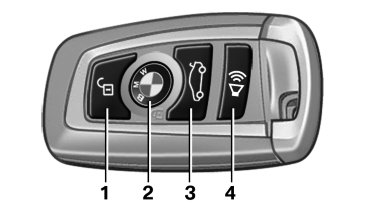
Buttons on the remote control
1 Unlocking
2 Locking
3 Opening the trunk lid
4 Panic mode in alarm system
See also:
Other services from BMW ConnectedDrive
New BMW 3-Series Sedan customers can order a selection of innovative remote
functions from BMW ConnectedDrive designed to provide the driver with
personalised assistance and therefore enhanced com ...
Displaying stored Check Control
messages
1. "Vehicle Info"
2. "Vehicle status"
3. "Check Control"
4. Select the text message. ...
Text messages
Calling the sender of a text message
1. Select the desired message.
2. Select the symbol.
Saving the sender in the contacts
1. Highlight the desired message.
2. Open "Options".
3. &qu ...