
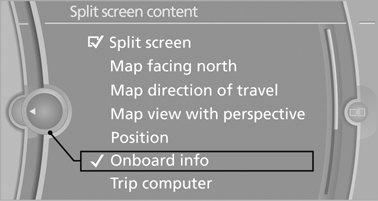
Selecting the display
1.
 Press the button.
2. "Split screen" 3. Move the controller until the split screen is selected.
4. Press the controller or select "Split screen content".
5. Select the desired menu item.
See also:
Activating/deactivating the system
manually
Using the button
Press the button.
▷ LED comes on: Auto Start Stop function is
deactivated.
The engine is started during an automatic
engine stop.
The engine can only be stopped or st ...
Filtering the message list
The message list can be filtered when more than
one type of message exists.
1. "Filter:"
2. Select the type of message.
▷ "All"
All messages are displayed.
▷ & ...
Camera
Camera
The camera is located near the base of the mirror.
Keep windshield clean and clear in the area in
front of the interior rear view mirror. ...