
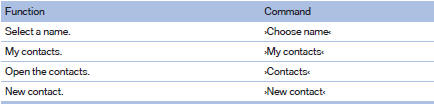
Contacts
See also:
Low beams
Switch position with the
ignition switched
on: the low beams light up. ...
Running a function
Press the button.
The function will run immediately. This
means, for example, that the number is dialed
when a phone number is selected. ...
The concept
The central locking system becomes active
when the driver's door is closed.
The system simultaneously engages and releases
the locks on the following:
▷ Doors.
▷ Trunk lid.
▷ ...