
CD/multimedia
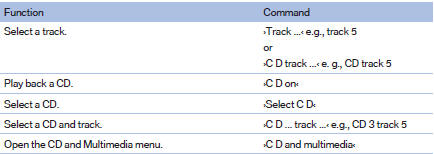
CD/DVD drive

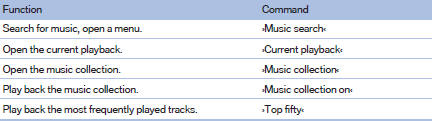
Music collection
External devices

Tone

See also:
Vehicle equipment
All standard, country-specific and optional
equipment that is offered in the model series is
described in this chapter. Therefore, equipment
is also described that is not available in a vehicle, ...
Entering a phone number
Dialing a number
1. "Telephone"
2. "Dial number"
3. Select the digits individually.
4. Select the
symbol.
Dialing a number
The phone number can also be entered by voice. ...
Antilock Brake System ABS
ABS prevents locking of the wheels during braking.
The vehicle remains steerable even during full
brake applications, thus increasing active
safety.
ABS is operational every time you start the e ...