
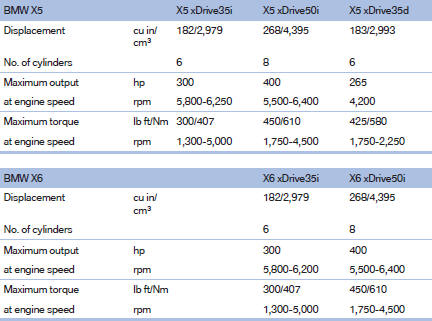
Engine specifications
See also:
Malfunction
Comfort Access may not function properly if it
experiences interference from external sources
such as mobile phones, metal objects, overhead
power lines, transmission towers, etc.
In this case, ...
Safety
Standard safety features include antilock brakes, an electronic stability
system, side-impact airbags for the front seats, side curtain airbags for both
rows, and active front head restraints.
F ...
Safety information
The tire characteristics and tire inflation pressure
influence the following:
► The service life of the tires.
► Road safety.
► Driving comfort. ...