
Sorting the task list
1. Select the header in the task list.
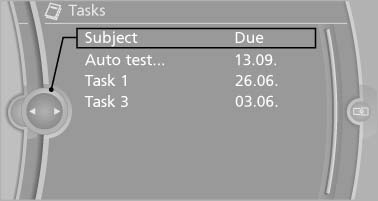
Sorting the task list
2. Select the sorting criterion:
▷ "Priority (!)"
▷ "Subject"
▷ "Due date"
See also:
Saving the spoken instructions on the
programmable memory buttons
The function for switching the spoken instructions
on/off can be stored on a programmable
memory button, for quick access. ...
General information
Refuel promptly
Refuel below a range of 30 miles/50 km;
otherwise, engine functions are not ensured and
damage may occur. ...
Daytime running lights
With the ignition switched on, the daytime running
lights light up in position 0, or
.
After the ignition is switched off, the parking
lamps light up in position .
Activating/deactivating
1. ...