
Filtering the message list
The message list can be filtered, when more than one type of message exists.
1. "Filter:"
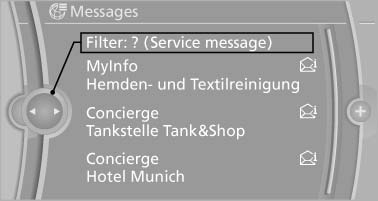
2. Select the type of message.
▷ "All"
All messages are displayed.
▷ "E-mail"
Only e-mails from the mobile phone are
displayed.
▷ "Service message"
Only messages from the BMW Assist
Concierge service and My Info are displayed.
▷ "Text message"
Only text messages from the mobile
phone are displayed.
See also:
Automatic Soft Closing
To close the doors, push lightly.
It is closed automatically.
Danger of pinching<>
Make sure that the closing path of the
doors is clear; otherwise, injuries may result.◀ ...
Top View
The concept
Top View assists you in parking and maneuvering.
The area around the doors and the road area
around the vehicle are shown on the Control
Display for this purpose.
Capturing the imag ...
FTM Flat Tire Monitor
The concept
The system does not measure the actual inflation
pressure in the tires.
It detects a pressure loss in a tire by comparing
the rotational speeds of the individual wheels
while moving ...