
Opening the favorites
If an activated favorite is played back, the following message appears for approx. 20 seconds "Favorite alert!".
 "Favorites"
Select the symbol while the message is shown.
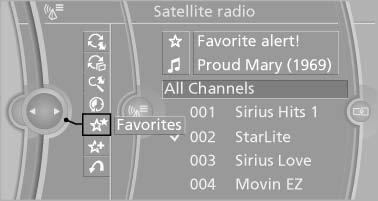
Favorites
The displayed favorite is played.
If there is no message, the system changes to the My Favorites category. All favorites currently being broadcast can be selected from a list.
See also:
Operating from the inside
Operating from the inside
Via the button for the central locking system.
If the vehicle has been locked from inside, the
fuel filler flap remains unlocked.
If an accident of a certain severity ...
General information
Contacts can be created and edited and the addresses
can be adopted as destinations for navigation. ...