
Changing the list view
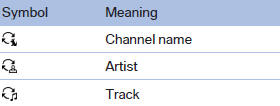
The list view changes every time the first symbol on the navigation bar is pressed.
Information on the channel is displayed
See also:
DSC OFF
When DSC OFF, is active,
driving stability is limited during acceleration
and when driving in bends. ...
Washer fluid
Washer fluid is flammable. Therefore, keep it
away from ignition sources and only store it in the closed original container that
is kept out of reach of children; otherwise, there is a risk of pe ...
Vehicle equipment
All standard, country-specific and optional
equipment that is offered in the model series is
described in this chapter. Therefore, equipment
is also described that is not available in a vehicle,
e ...