
Navigation bar overview
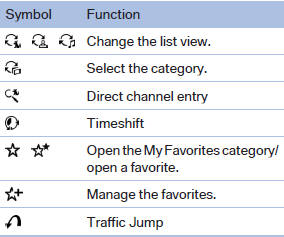
The functions of the navigation bar symbols can also be stored on the programmable memory buttons
See also:
Visual warning
The approach to an object can be shown on the
Control Display. Objects that are farther away
are displayed on the Control Display before a
signal tone sounds.
Visual warning
The display appe ...
System limits
Be alert
Due to system limitations, warnings may
be not be issued at all, or may be issued late or
improperly. Therefore, always be alert and ready
to intervene; otherwise, there is the danger ...
Current fuel consumption
Displays the current fuel consumption.
You can check
whether you are currently driving
in an efficient and environmentally-
friendly manner.
Displaying the current fuel
consumption
1. &q ...