
RDS
RDS broadcasts additional information, such as the station name, in the FM wave band. When playing a station with multiple frequencies, the system automatically switches to the frequency with the best reception, if needed.
Switching the RDS on/off
1. "Radio"
2. "FM"
3. Open "Options".
4. "RDS"
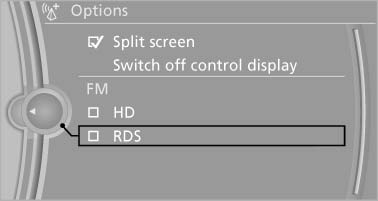
RDS
The setting is stored for the remote control currently in use.
See also:
Adjusting the volume
Adjusting the volume
Turn the knob until the desired volume is selected.
The setting is stored for the remote control
currently in use.
The vehicle automatically adjusts the volume of
the mic ...
General information
Your vehicle contains advanced technology for
the reduction of fuel consumption and emissions.
Fuel consumption depends on a number of different
factors.
The implementation of certain measures, ...
xDrive
xDrive is the all-wheel-drive system of your vehicle.
Concerted action by the xDrive and DSC
further optimize traction and driving dynamics.
The xDrive all-wheel-drive system variably distributes ...