
Controls
Controls
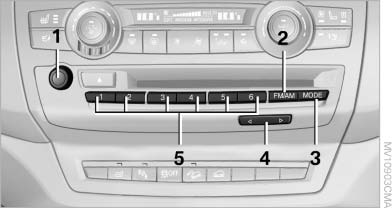
1 Volume, on/off
2 Change wave band
3 Change entertainment sources
4 Change station/track
5 Programmable memory buttons
See also:
Automatic deactivation
In certain situations, the Automatic Engine Start/
Stop Function is deactivated automatically for
safety reasons, such as when the driver is detected
to be absent.
Malfunction
The automatic en ...
Capacities
...
Supplementary text messages
You can call up more information, e.g., on the
cause of a malfunction and on how to respond,
via Check Control.
In urgent cases, this information will be shown
as soon as the corresponding lamp ...