
Entering a town/city
1. Select "Town/City/Postal Code" or the displayed town/city.
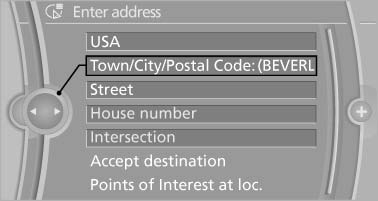
Town/City/Postal Code
2. Select letters, if necessary.
The list is narrowed down further with each entry.
3. Move the controller to the right.
4. Select the name of the town/city from the list.
If there are several towns/cities with the same name:
1. Change to the list of town/city names.
2. Highlight the town/city.
3. Select the town/city.
See also:
Warning stages
Prewarning
This warning is issued, for example, when there
is the impending danger of a collision or the distance
to the vehicle ahead is too small.
Acute warning
Warning of the imminent danger ...
The concept
▷ Most functions that are displayed on the
Control Display can be operated by spoken
commands via the voice activation system.
The system prompts you to make your entries.
▷ Function ...
Energy recovery
The energy of motion of the
vehicle
is converted to electrical energy
while coasting. The vehicle
battery is partially charged and
fuel consumption can be lowered. ...