
Storage compartment
A storage compartment is located under the armrest between the front seats and, depending on the vehicle's equipment, also a cover for the mobile phone cradle or the snap-in adapter.
Details on this mobile phone cradle
Opening
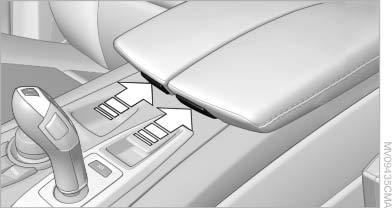
Opening
Push cover down slightly and press the button.
The cover folds upward.
Connection for an external audio device
You can connect an external audio device such as a CD or MP3 player and play audio tracks over the car's loudspeaker system:
▷ AUX-IN port.
▷ USB audio interface.
See also:
Pinch protection system
If the closing force when closing the glass sunroof
exceeds a certain value, the closing movement
is stopped, beginning at approximately the
middle of the opening in the roof, or from the
tilt ...
Activating/deactivating the functions
Several menu items are preceded by a checkbox.
It indicates whether the function is activated
or deactivated. Selecting the menu item
activates or deactivates the function.
The function is acti ...
Changing the scale
1. Select the symbol.
2. To change the scale: turn the controller.
Automatically scaled map scale
In the map view facing north, turn the controller
in any direction until the AUTO scale is displ ...