
Opening
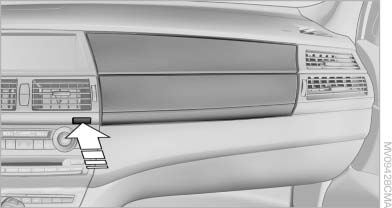
Opening
Press the button. The covers open upward and downward and the lighting in the glove compartment switches on.
 Close the glove compartment again immediately
Close the glove compartment immediately after
use while driving; otherwise, injury may occur
during accidents.◀
Closing
Press one of the two covers closed.
See also:
Luxury Line
The discreet high-gloss chrome elements of this line lend the exterior of the
BMW 3-Series Sedan a particularly elegant and exclusive appeal. The BMW kidney
grille with 11 fine chrome slats, two s ...
Terminating destination
guidance
1. "Navigation"
2. "Map"
3. "Guidance"
4. "Stop guidance" ...
Tilt alarm sensor
The tilt of the vehicle is monitored.
The alarm system responds in situations such
as attempts to steal a wheel or tow the car. ...