
Preselecting activation times
1. "Settings"
2. "Climate"
3. "Activate Timer 1" or "Activate Timer 2"
4. "Timer 1:" or "Timer 2:"
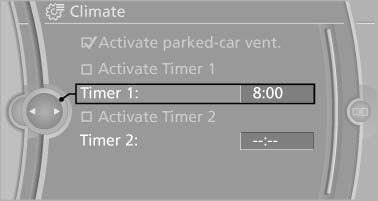
Preselecting activation times
5. Set the desired time.
 The symbol on the
automatic climate control
lights up when the switch-on time is activated.
The symbol on the
automatic climate control
lights up when the switch-on time is activated.
 The symbol on the automatic
climate control
flashes when the system has been switched on.
The symbol on the automatic
climate control
flashes when the system has been switched on.
The system will only be switched on within the next 24 hours. After that, it needs to reactivated.
See also:
Radio
Your radio is designed for reception of the following stations:
> FM and AM
> HD Radio
> Satellite radio ...
Starting Roadside Assistance with
BMW Assist or TeleService
General information
In vehicles equipped with TeleService, support
is first offered by TeleService Diagnosis and
then, if necessary, by TeleService Help.
1. "BMW Assist" or "Conne ...
Brake force display
The concept
During normal brake application, the outer
brake lamps light up.
During heavy brake application, the inner
brake lamps light up in addition.
...