
Manual air distribution
The air flow can be guided into the vehicle interior, separately for the driver's and front passenger side, using one of the following programs:
▷ Upper body region.
▷ Upper body region and footwell.
▷ Footwell.
▷ Driver's side: in addition, the windshield,
side windows, and footwell.
Selecting program
 Press the button repeatedly
until the
desired program is shown on the Control
Display.
Press the button repeatedly
until the
desired program is shown on the Control
Display.
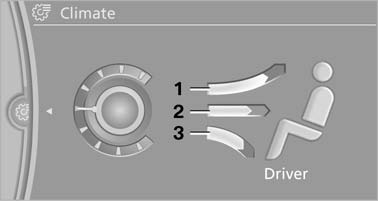
Selecting program
1. Air toward the windshield and side windows
2. Air for the upper body
3. Air to footwell
Pressing the AUTO button cancels the manual air distribution settings.
The automatic mode for the air volume remains effective with manual air distribution.
See also:
Vehicle equipment
All standard, country-specific and optional
equipment that is offered in the model series is
described in this chapter. Therefore, equipment
is also described that is not available in a vehicle, ...
Use coasting conditions
When approaching a red light, take your foot off
the accelerator and let the vehicle coast to a halt.
On a downhill gradient, take your foot off the accelerator
and let the vehicle roll.
The flo ...
Automatic climate control
1 Air distribution, left
2 Temperature, left
3 AUTO program, left
4 Air volume, AUTO intensity, residual heat,
left
5 Remove ice and condensation
6 Maximum cooling
7 Display
8 Air volume, A ...