
One lever for all functions
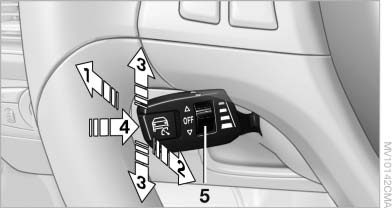
One lever for all functions
1 Storing and increasing the desired speed
2 Storing and red
3 Interrupting or deactivating the system
4 Retrieving the stored desired speed and distance or driving away
5 Selecting the distance to the vehicle ahead
See also:
Welcome lamps
When parking the vehicle, leave the switch in
position or
: the parking and interior
lamps light up briefly when the vehicle is unlocked.
Activating/deactivating
1. "Settings"
2. &quo ...
Pairing and connecting cell phone
Pairing the mobile phone
To avoid becoming distracted and posing
an unnecessary hazard both to your own vehicle's
occupants and to other road users, only
pair the mobile phone while the vehicl ...
At a glance
1 Temperature
2 AUTO program
3 Vent settings
4 Air volume, AUTO intensity
5 Display
6 Maximum cooling
7 Seat heating
8 Active seat ventilation
Note
The air volume of the automatic climate c ...