
Selecting chassis and suspension tuning
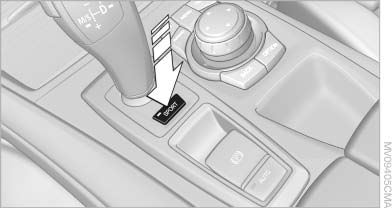
Selecting chassis and suspension tuning
Press the button.
The system switches between the two chassis and suspension tuning settings.
▷ Sport:
The LED in the button lights up and SPORT
is displayed in the instrument panel.
▷ Normal:
The LED in the button goes out.
The selection of the chassis and suspension tuning setting is stored for the remote control currently in use.
See also:
Exciting, elegant, innovative design
The drive-train layout, with a longitudinally mounted in-line engine at the
front and rear-wheel drive, is unique within the compact segment. This improves
the new BMW 1-Series' handling, and is a ...
Correctly adjusted head restraint
A correctly adjusted head restraint reduces the
risk of injury to cervical vertebrae in the event of
an accident.
Adjusting the head restraint
Correctly adjust the head restraints of all
occu ...
Coolant level
Checking
1. Let the engine cool.
2. The coolant level is correct if it lies between
the minimum and maximum marks. The
marks are on the side of the coolant reservoir.
Adding engine oil
1. Let ...