
Displays in the instrument cluster
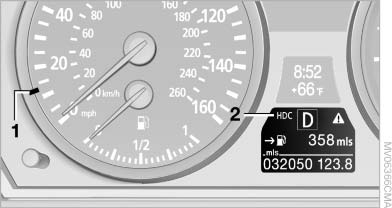
Displays in the instrument cluster
1, Display for target speed
2, HDC display
See also:
Vehicle equipment
All standard, country-specific and optional
equipment that is offered in the model series is
described in this chapter. Therefore, equipment
is also described that is not available in a vehicle,
e ...
Controls
Controls
1. Control Display
2. Controller with buttons
The buttons can be used to open the menus
directly. The controller can be used to select
menu items and create the settings.
The button ...
Overview
The hearts of sports car aficionados with an eye for beauty and a thirst for
luxury and innovative technology will beat a little faster with the arrival of
the new BMW 6-Series Coupe. The third ge ...