
Display
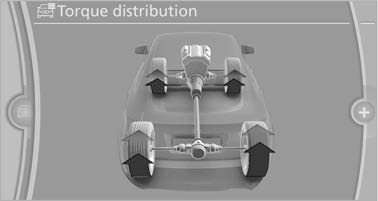
The Control Display shows how xDrive and Dynamic Performance Control are distributing the drive forces.
1. "Vehicle Info"
2. "Torque distribution"
Torque distribution
The current distribution of drive forces is indicated by arrows pointing to all four wheels.
The highlighted arrows show the drive forces currently present. The longer an arrow is, the greater the drive forces in the associated wheel.
The transparent arrows indicate the maximum value the drive forces over the last 10 seconds.
Malfunction
Malfunctions are displayed via Check Control
See also:
Odometer, external temperature display, clock
Odometer, external
temperature display, clock
1. Knob in the instrument cluster
2. Time, external temperature, and date
3. Odometer and trip odometer ...
Children on the front passenger seat
Should it ever be necessary to use a child restraint
fixing system in the front passenger seat,
make sure that the front, knee and side airbags
on the front passenger side are deactivated. Autom ...
Playing a supporting role: The innovative new 8-speed automatic
transmission.
Like many new BMW models, the new BMW X3 features an 8-speed automatic
transmission which brings smooth shifting, sportiness and efficiency to new
levels of perfection. Compared to the exemplary 6 ...