
Switching on/off
Switching on/off
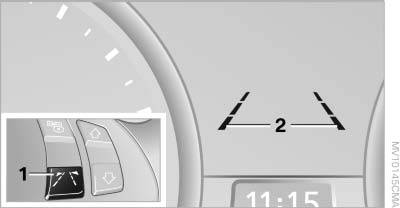
Press button 1 on the steering wheel.
▷ On: lane markings 2 are lit.
▷ Off: lane markings 2 go out.
The system can issue warnings at speeds above approx. 40 mph/65 km/h.
The state is stored for the remote control currently in use.
See also:
Xenon headlamps
Because of the long life of these bulbs, the likelihood
of failure is very low. Switching the lamps
on and off frequently shortens their life.
If a bulb fails, switch on the front fog lamps and
...
Weights
Coupe
Convertible ...
PostCrash
In the event of an accident, the system can bring
the car to a halt automatically without intervention
by the driver in certain situations. This can
reduce the risk of a further collision.
Depr ...