
Activating/deactivating via iDrive
1. "Settings"
2. "Lighting"
3. "High beam assistant"
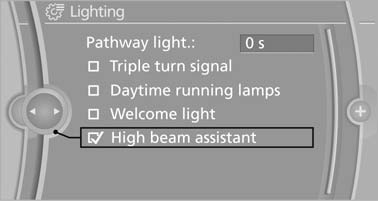
High beam assistant
The setting is stored for the remote control currently in use.
See also:
Interior motion sensor
The windows and glass sunroof must be closed
for the system to function properly. ...
Shift paddles for Sport automatictransmission
The shift paddles on the steering wheel allow
you to shift gears quickly while keeping both
hands on the steering wheel.
If the shift paddles on the steering wheel are
used to shift gears in a ...
Convertible: through-loading opening with integrated transport bag
The transport bag is designed for safe, clean transport of up to 4 pairs of standard
skis or up to 2 snowboards.
With the transport bag you can stow skis up to a length of 6.6 ft/2.0 m. When
skis ...