
Switching the high beams on and off manually
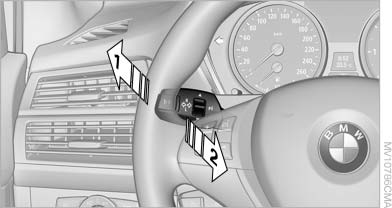
Switching the high beams on and off manually
▷ High beams on, arrow 1.
▷ High beams off/headlamp flasher, arrow 2.
To reactivate the High-beam Assistant, briefly push the turn indicator lever toward the high beams.
See also:
General information
Contacts can be created and edited and the addresses
can be adopted as destinations for navigation. ...
Distance
Selecting a distance
Adjust the distance according to the traffic
and weather conditions; otherwise, there is the
danger of an accident occurring. Maintain the
prescribed safety distance.φ ...
Gear shift indicator
The concept
The system recommends the most fuel efficient
gear in the current driving situation.
Displays
Indicators to shift up or down are displayed in
the instrument cluster.
...