
Welcome lamps
When parking the vehicle, leave the switch in
position  or
or
 : the parking and interior
lamps light up briefly when the vehicle is unlocked.
: the parking and interior
lamps light up briefly when the vehicle is unlocked.
Activating/deactivating the welcome lamps
1. "Settings"
2. "Lighting"
3. "Welcome light"
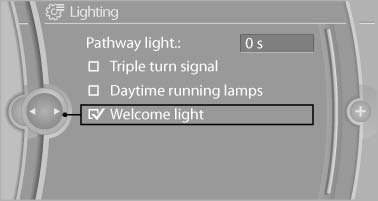
Welcome light
The setting is stored for the remote control currently in use.
See also:
Tone
Vehicle equipment
All standard, country-specific and optional
equipment that is offered in the model series is
described in this chapter. Therefore, equipment
is also described that is not avai ...
Adjusting the info display
You can select what information from the computer
is to be displayed on the info display of the
instrument cluster.
1. "Settings"
2. "Info display"
3. Select the desired dis ...
Adjusting volume
Turn knob 1next to the CD/DVD player until the desired volume is obtained.
You can also adjust the volume with buttons on the steering wheel. ...