
Displaying information on the instrument panel
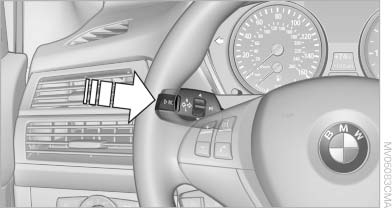
Displaying information on the
instrument panel
Press the computer button on the turn signal lever.
Information is displayed in the instrument cluster.
See also:
Calling up settings
Do not retrieve the memory setting while
driving
Do not retrieve the memory setting while driving,
as an unexpected seat movement could result
in an accident.◀
Comfort function
1. Ope ...
Apps
At a glance
Certain software applications of a suitable cell
phone can be integrated in the vehicle. These
software applications are displayed on the Control
Display.
They are operated via iDr ...
Cargo
The trunk is decently sized, but not as big as you'd expect in a car this
mammoth. At 14 cubic feet, it fit our department's standard-size golf bags that
we test in every car, but my personal over ...