
Engine oil temperature
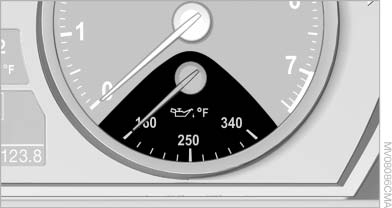
Engine oil temperature
▷ Cold engine: the pointer is at the low temperature
end. Drive at moderate engine and
vehicle speeds.
▷ Normal operating temperature: the pointer
is in the middle or in the right half of the temperature
display.
▷ Hot engine: the pointer is at the high temperature
end. Switch off the engine immediately
and allow it to cool down.
If the engine oil temperature is too high, a message appears on the Control Display.
Check the oil level,
See also:
Active head restraint
In the event of a rear-end collision with a certain
severity, the active head restraint automatically
reduces the distance from the head.
Reduced protective function
▷ Do not use seat or ...
Manual transmission
Gearshift lever in neutral position.
Towing
Follow the towing instructions
Follow all towing instructions; otherwise,
vehicle damage or accidents may occur.
▷ Make sure that the ignition ...
Opening/closing the sliding visor
► Press the switch in the
desired
direction to the resistance
point and hold it there.
The sliding visor moves while
the switch is being held.
► Press the switch in the desired ...