
Storing
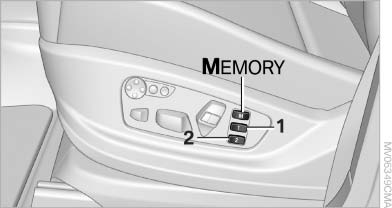
Storing
1. Switch on the radio ready state or the ignition
2. Set the desired seat, exterior mirror and steering wheel positions.
3.  Press the button. The LED in
the
button lights up.
Press the button. The LED in
the
button lights up.
4. Press the desired memory button 1 or 2. The LED goes out.
If the M button is pressed accidentally:
 Press the button again. The LED
goes
out.
Press the button again. The LED
goes
out.
See also:
BMW 320d EfficientDynamics Edition: state-of-the-art diesel engine makes the
new sports sedan the most efficient vehicle in its class
Drivers who don't want to miss out on either dynamic, sporty performance or
first-class fuel economy will find the new BMW 320d EfficientDynamics Edition an
extremely attractive proposition. As in ...
Display on the Control Display
Switching on the backup camera via the
iDrive
With PDC activated:
"Rear view camera"
The backup camera image is displayed. The setting
is stored for the remote control currently in
...
Closing
Recessed grips in the interior trim of the trunk
lid make it easier to pull down the lid.
Danger of pinching
Make sure that the closing path of the
trunk lid is clear; otherwise, injuries may ...