
Front seats: adjusting the distance from the back of the head
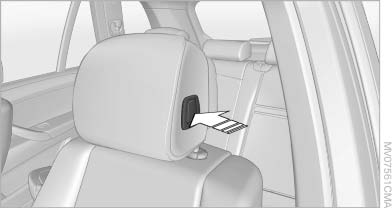
Front seats: adjusting the distance
from the back of the head
Press the button and pull the headrest cushion forward or push it back.
 Compromised performance
Do not place any objects behind the headrest
cushion. Otherwise, you can impair the
proper function of the head restraint.◀
See also:
Configuring cell phone
Additional functions can be activated or deactivated
for paired and connected mobile phones.
1. "Telephone".
2. "Bluetooth® (phone)".
3. Highlight the mobile phone to be confi ...
Sorting the task list
1. Select the header in the task list.
Sorting the task list
2. Select the sorting criterion:
▷ "Priority (!)"
▷ "Subject"
▷ "Due date" ...
Welcome lamps
When parking the vehicle, leave the switch in
position or
: the parking and interior
lamps light up briefly when the vehicle is unlocked.
Activating/deactivating
1. "Settings"
2. &quo ...