
Front
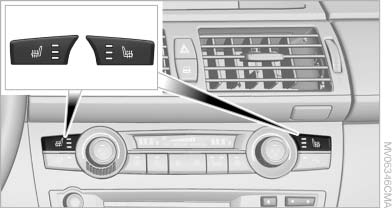
Seat heating
The temperature setting progresses one step through its control sequence each time you press the button. The maximum temperature is reached when three LEDs are lit.
To switch off: press and hold the button.
The temperature is reduced, if need be, down to no heat in order to reduce the load on the battery.
The LEDs remain lit.
See also:
Joint development and production together with the BMW-7-Series.
The world debut of the new BMW 5-Series Sedan opens up the latest chapter in
a truly impressive story of success. In the course of five model generations,
overall sales of the BMW 5-Series already ...
Switching off automatically
System switches off: above approx. 9 mph/
15 km/h.
Switch on the system again if necessary. ...
High beams/roadside parking lamps
1 High beams
2 Headlamp flasher
3 Roadside parking lamps
Roadside parking lamps, left or rightThere is an additional option of
switching on the lamps on the side of the car fa ...