
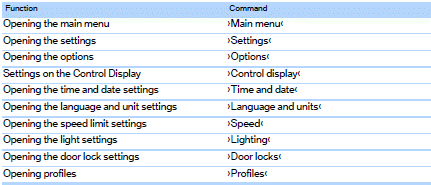
Settings
Vehicle

See also:
Capturing the image
The image is captured by two cameras
integrated in the exterior mirrors and by the
backup camera.
The range equals:
▷ Approx. 7 ft/2 m to the side.
▷ approx. 7 ft/2 m to the rear.
...
Parked-car ventilation
The concept
The parked-car ventilation ventilates the vehicle
interior and lowers its temperature, if necessary.
The system can be switched on and off directly
or by using two preset switch-on ...
Visual warning
The approach to an object can be shown on the
Control Display.
When the distance to an object is small, the PDC
display correspondingly shows a red bar in front
of the vehicle.
The display a ...