
Useful short commands
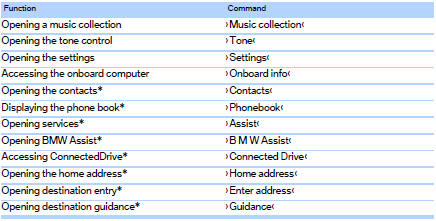
See also:
Storage compartments inside the vehicle
Compartments are located next to the steering column, on the doors and
in the center console.
Coupe: clothes hooksThere are clothes hooks in the rear.
Items of clothing hung from the hooks must n ...
Vehicle equipment
All standard, country-specific and optional
equipment that is offered in the model series is
described in this chapter. Therefore, equipment
is also described that is not available in a vehicle,
e ...
Buckling the belt
Make sure you hear the latch plate engage in the
belt buckle. ...