
Service status
Displaying available services
Display of all services available in the vehicle.
1. "BMW Assist" or "ConnectedDrive"
2. "Service Status"
3. "Available services"
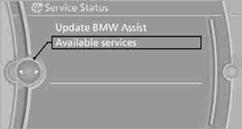
Manually updating BMW TeleServices, BMW Assist, and BMW Online.
"Update BMW Assist"
See also:
Vehicle battery
Maintenance
The battery is maintenance-free, i.e., the electrolyte
will last for the life of the battery.
Your service center will be glad to advise you on
questions regarding the battery.
Batt ...
Example: playing back a CD
1. Switch on the Entertainment sound output
if necessary.
2.
Press the button on the steering
wheel.
3. ›C D and multimedia‹
The medium last played is played back.
4.
Press the button ...
Displays in the instrument cluster
Indicator lamp
Depending on how the vehicle is
equipped,
the indicator lamp in the instrument
cluster indicates whether the system is
switched on.
Desired speed
▷ The marking lights ...