
Service Request
At a glance
Inform your BMW center that you need to schedule a service appointment. The Teleservice data is transmitted during a Service Request. If possible, your BMW center will establish contact with you.
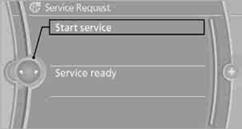
Starting a Service Request1. "BMW Assist" or "ConnectedDrive"
2. "Service Request"
3. "Start service"
See also:
X5 M in the Market
Purists might grumble about the revered M badge spreading to BMW's
crossovers, but as other manufacturers have shown, there's money to be made in
high-performance SUVs; you need only look at Merce ...
General driving notes
Closing the trunk lid
Drive with the trunk lid closed
Only drive with the tailgate closed; otherwise,
in the event of an accident or braking or
evasive maneuvers, passengers or other road
use ...
Fuel cap
The indicator lamp
lights up.
If the fuel cap is not properly tightened,
the OBD system may conclude that
fuel vapor is escaping. If the cap is then tightened,
the display should go out in a ...