
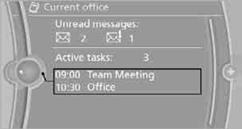
Current office
The number of unread messages and active tasks as well as upcoming appointments are displayed.
1. "Office"
2. "Current office"
3. Selecting the desired entry to display details.
See also:
System limits
Top View cannot be used in the following situations:
▷ With a door open.
▷ With the trunk lid open.
▷ With an exterior mirror folded in.
▷ In poor light.
A Check Control m ...
Before mounting
If the rear seat backrests are adjustable:
Before mounting child restraint fixing systems,
return all of the rear seat backrests to the basic
position. ...
Setting the voice dialog
You can set whether the system should use the
standard dialog or a shorter version.
In the shorter variant of the voice dialog, the announcements
from the system are issued in an
abbreviated fo ...