
Opening the favorites
If an activated favorite is being played, the message "Favorite alert!" appears for approx.
20 seconds.
Select  "Favorites" while the alert message is
being displayed.
"Favorites" while the alert message is
being displayed.
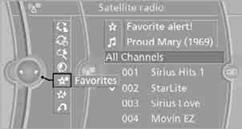
The displayed favorite is played.
If there is no message, the system changes to the My Favorites category. All favorites currently being broadcast can be selected from a list.
See also:
Adjusting electrically
Adjusting electrically
1. Forward/backward
2. Height
3. Seat tilt
Backrest
4. Backrest
Differs depending on seat:
Differs depending on seat
1. Backrest
2. Height
Additional depending o ...
Storing stations
Via iDrive1. "Radio"
2. "FM" or "AM"
3. Select the desired station.
4. Press the controller for an extended period.
5. Select the desi ...
Audio playback
Selecting the track using the button
Press the button repeatedly
until the
desired track is played.
Selecting a track via iDrive
Audio CDs
Select the desired track to begin playback.
CDs/D ...